











Endings

Ending Settings is where you, the creator, can set up an ending for each start setting.
Try setting up an ending for each start setting. Only the ending that meets its conditions first will be delivered.
When the AI judges the situation and finds that a specific condition is met,
it delivers a wonderful epilogue to the player who reached the ending's conditions.

1. Setting the Ending Image

•
Register the image that will be shown when the ending is reached.
•
You can register it at up to 5MB, in card size (1,005 × 1,490px).
2. Setting the Ending Rarity

•
Each ending can be given one of four rarity grades. (N / R / SR / SSR) The higher the grade, the tougher the conditions to reach that ending, and a badge matching the grade is shown on the ending card.
•
To preserve the rarity of endings, there's a maximum number allowed per grade.
Number of Endings | Available Grades |
2 or fewer | N / R |
3–5 | N / R / SR (1) |
6–8 | N / R / SR (2) / SSR (1) |
9 or more | N / R / SR (2) / SSR (2) |
•
The number of endings in a higher grade must be fewer than in a lower grade.
Q. Can I change a card's grade after publishing?
A. Yes! After publishing your work, you can check how many cards each ending has issued and use that to adjust the grades or as a reference for your next work.
If an ending card's grade is changed or deleted, the grade of cards that have already been issued won't change.
3. Setting the Ending Name

•
You can set a name for the ending. (Up to 40 characters)
•
Give your ending a name with personality!
4. Setting Ending Conditions
1. Ending Conditions

When the ending conditions you set are met, the AI judges whether it fits the current context and activates the ending—so it happens naturally without disrupting the flow of play!
•
Conditions are checked from at least turn 10, and every 5 turns after that.
•
Turn-count condition (required): You can set it from a minimum of 10 turns, choosing 10 / 15 / 20 / 25 / 30 turns or entering your own value.
•
Detailed conditions (optional): If stats are set up, you can combine stat-based rules to build more specific conditions for reaching the ending.
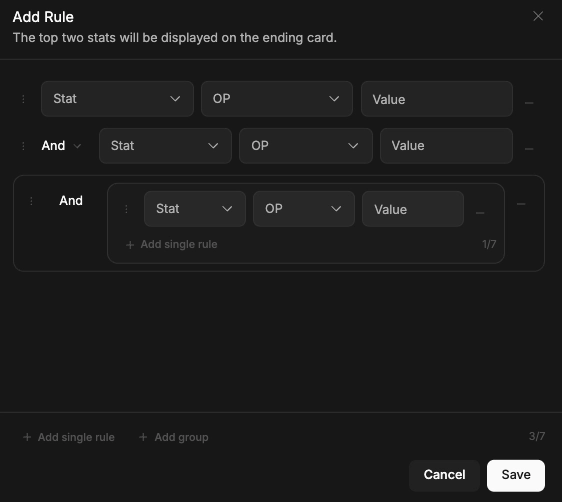
You can use a single rule (stat + operator + value) or a rule group (AND/OR).
You can set up to 7 rules per step, and reorder them by drag and drop.
2. Prompt
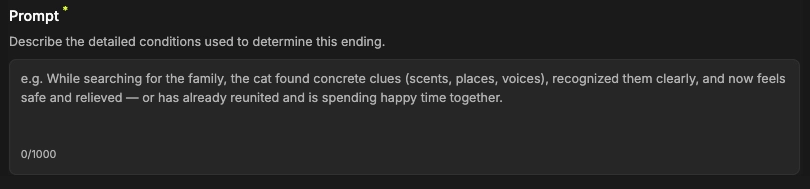
Set the basic criteria that decide this ending! The more specifically you write out the choices, conditions, and outcomes in the story, the more precisely the AI completes an ending that matches your intent!
3. Epilogue

Enter the content of the ending. If you use the auto-generate feature, the AI polishes the ending to be even more complete based on the prompt you entered! When you flip the ending card, the epilogue you wrote here unfolds!
Example)


4. Ending Hint

This is a line that gives users a subtle clue toward the ending! Keeping it from being too direct can deepen immersion in the story.
Among the endings you've set up, if the same ending is reached multiple times, a new card stacks up each time—and if it's reached within the top 5, a ranking badge is shown alongside it!
If an ending has stat conditions set, the card also shows its key stat values.
Please note that you, as the creator, aren't given an ending rank. :)